本文使用weixin4j工具包,实现SpringBoot中微信网页授权功能,并获取用户信息。
使用weixin4j工具包1.0.0版本,官网 https://developers.weixin.qq.com/doc/offiaccount/OA_Web_Apps/Wechat_webpage_authorization.html
从微信文档中我们可以发现有以下几个步骤: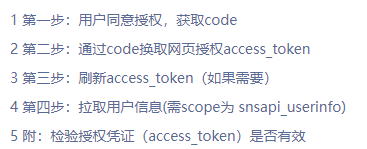
在这里我整理了一个最简便的实现方式,请大家参考
首先在pom.
<!-- 微信工具包 --><dependency> <groupId>org.weixin4j.spring.boot</groupId> <artifactId>weixin4j-spring-boot-starter</artifactId> <version>1.0.0</version></dependency><!-- 微信工具包 --><dependency> <groupId>com.github.liyiorg</groupId> <artifactId>weixin-popular</artifactId> <version>2.8.5</version></dependency>在 application.properties 文件中配置公众号 appid 和 Secret:
weixin4j.config.appid=yourappidweixin4j.config.secret=yoursecretController层需要接受的参数需要以下两个:
code:前端页面授权同意获取的code
url:微信js调用的url,也就是要授权的域名
Service层方法如下(核心):
@Transactionalpublic Map<String, Object> login(Map<String, Object> param) throws WeixinException { SnsUser snsUser = weixinTemplate.sns().getSnsUserByCode((String) param.get("code")); //通过code获取access_token信息 String subscribe = weixinTemplate.user().info(snsUser.getOpenid()).getSubscribe(); Map<String, Object> map = new HashMap<>(); //返回值map String randomStr = UUID.randomUUID().toString().substring(0, 18); map.put("appId", weixinTemplate.getAppId()); //appid,前端若不需要可忽略 Date date = new Date(); String sign = SignUtil.getSignature(weixinTemplate.getJsApiTicket().getTicket(), randomStr, new Long(date.getTime() / 1000).toString(), (String) param.get("url")); //-----以下代码根据具体业务处理----- map.put("subscribe",Integer.parseInt(subscribe)); //用户是否关注公众号 0-否,1-是 //拼装前端需要的返回结果 Map<String, Object> signature_dict = new HashMap<>(); signature_dict.put("nonceStr", randomStr); signature_dict.put("signature", sign); signature_dict.put("timestamp", new Long(date.getTime() / 1000)); map.put("signature_dict", signature_dict); //根据openid查询用户id,以此决定更新还是新增用户信息 WxUsers wxUsers = wxUsersMapper.selectIdByOpenid(snsUser.getOpenid()); if(wxUsers == null){ wxUsers = new WxUsers(); } wxUsers.setNickName(snsUser.getNickname()); wxUsers.setSex(snsUser.getSex()); wxUsers.setImg(snsUser.getHeadimgurl()); wxUsers.setOpenid(snsUser.getOpenid()); map.put("nickName",wxUsers.getNickName()); map.put("img",wxUsers.getImg()); if (wxUsers.getWxUsersId() == null) { wxUsersMapper.insert(wxUsers); map.put("wxUsersId",wxUsers.getWxUsersId()); } else { map.put("wxUsersId",wxUsers.getWxUsersId()); wxUsersMapper.updateByPrimaryKey(wxUsers); } return map;}到这里已经授权成功啦,短短几行代码实现了微信文档里麻烦的步骤
如果我的方法解决了大家的问题,希望大家可以点赞支持!希望对大家有所帮助!
转载请注明出处即可
原文转载:http://www.shaoqun.com/a/497288.html
黄远:https://www.ikjzd.com/w/1785
cima:https://www.ikjzd.com/w/1372
周宁:https://www.ikjzd.com/w/1647
本文使用weixin4j工具包,实现SpringBoot中微信网页授权功能,并获取用户信息。使用weixin4j工具包1.0.0版本,官网https://developers.weixin.qq.com/doc/offiaccount/OA_Web_Apps/Wechat_webpage_authorization.html从微信文档中我们可以发现有以下几个步骤:在这里我整理了一个最简便的实现方式
法瑞儿:法瑞儿
笨鸟转运:笨鸟转运
2020年五一珠海天气怎么样?五一珠海好玩景点推荐:2020年五一珠海天气怎么样?五一珠海好玩景点推荐
【东南亚旅游花费】--东南亚旅游价格:【东南亚旅游花费】--东南亚旅游价格
shopee 印尼站选品技巧:shopee 印尼站选品技巧

No comments:
Post a Comment